New Features & Updates

After you publish your trip, our new workflow will provide you with all the share options and invite you to send out a free email blast to as many recipients as you want!
SquadTrip|New Features & Updates
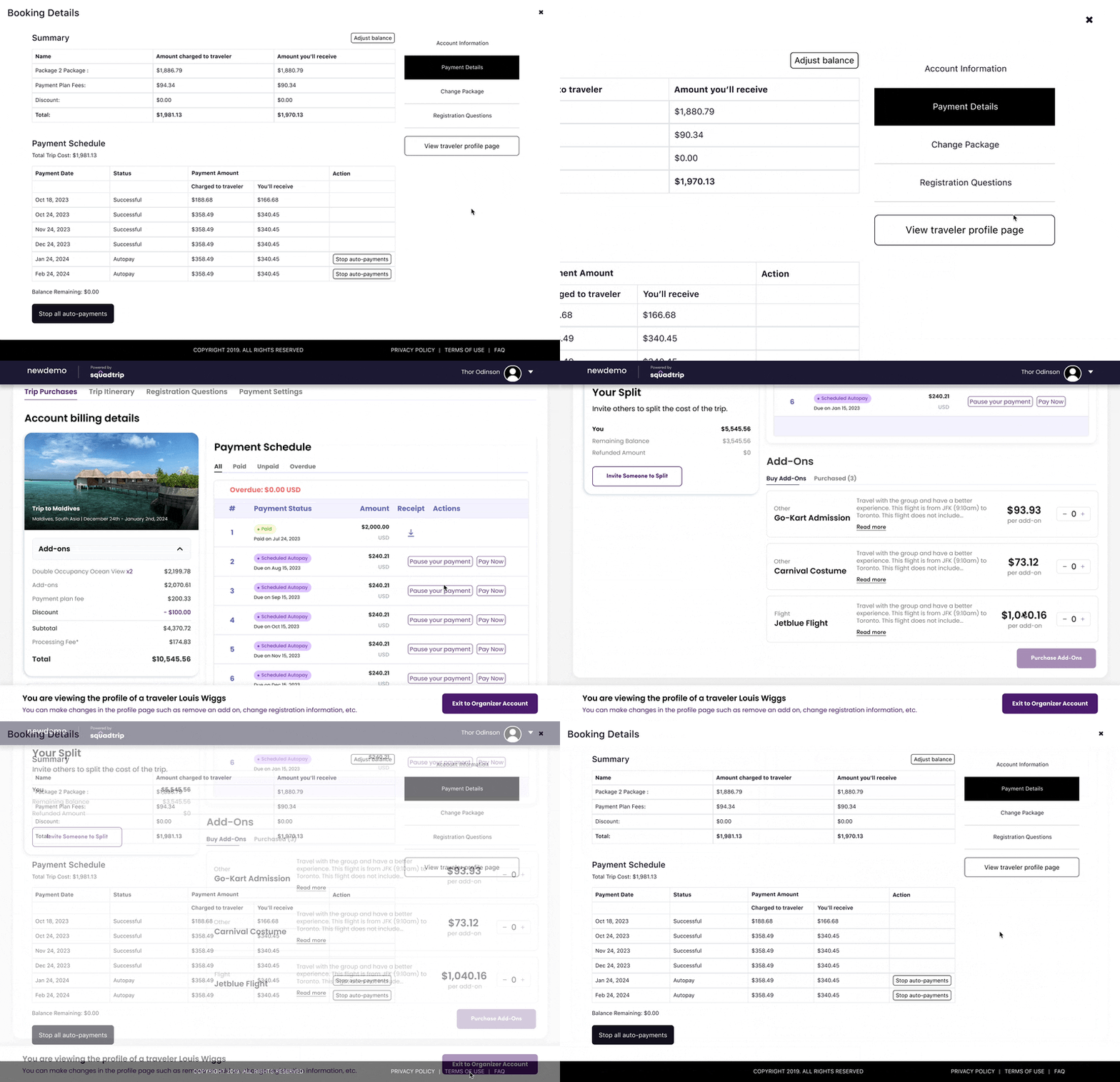
Want to see what your travelers see? Just click on their name from your account and you will open up their profile page. There you can manage add ons, submit a payment, change their credit card, adjust their payment date, registration information and more.
SquadTrip|New Features & Updates
Easily manage your traveler’s order at the click of a button. Need to edit the trip quantity, package selection, add ons or even the payment schedule? Just click “Edit Order” to quickly make any changes on behalf of your traveler.
SquadTrip|New Features & Updates
Sometimes travelers might start a purchase but dont finish! Now you can automatically send abandoned cart emails to travelers who registered but did not make a deposit. Increase conversion rates by re-engaging with potential travelers and encouraging them to complete their bookings.
SquadTrip|New Features & Updates
Now the whole name is visible of the traveler who signed up for the trip, and if the name is still to long we show the name in tooltip when we hover.

SquadTrip|New Features & Updates

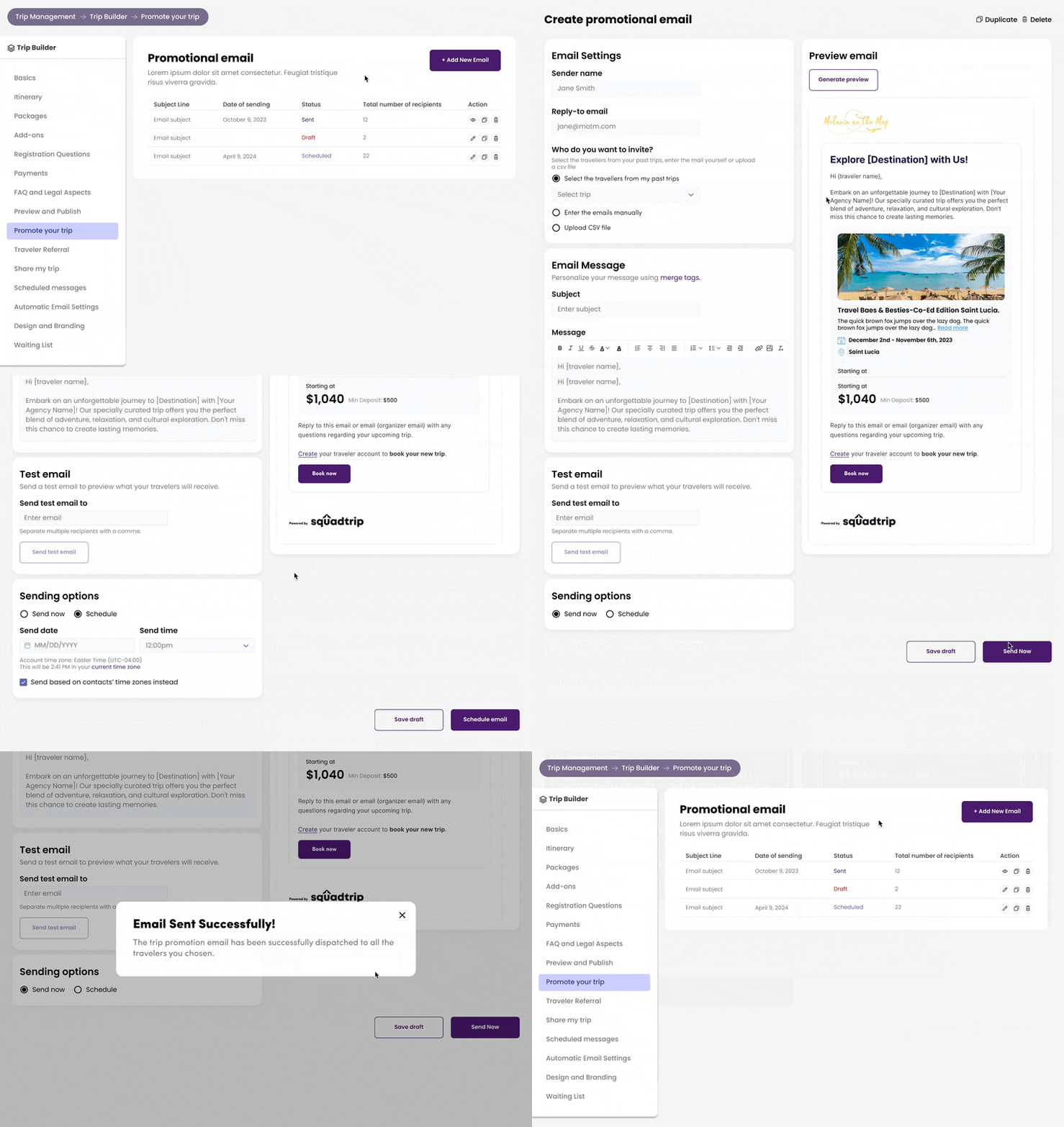
Easily promote your trips to your target audience by designing and sending personalized emails. Track the performance of your email campaigns and boost engagement with your promotions.

SquadTrip|New Features & Updates
The last thing we want to do is make the process of signing up to book a trip a drag. So now rather than having to create an account, travelers can sign in via google.
SquadTrip|New Features & Updates

The promo code section on https://squadtrip.com now includes the option for organizers to specify if the discount applies to the total booking amount or per person, providing clarity and control over promo code usage.

SquadTrip|New Features & Updates

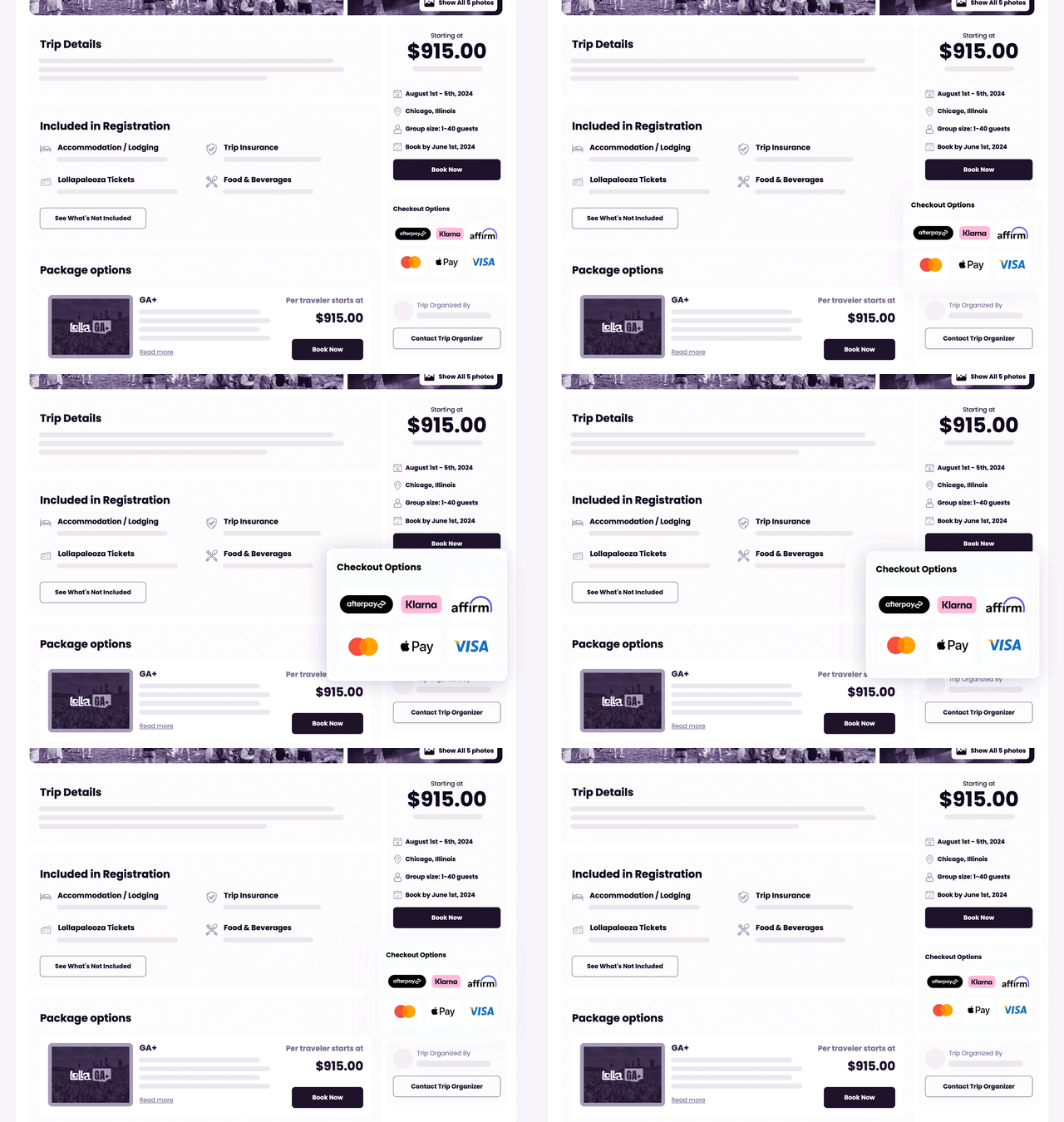
We recently activated Klarna, Afterpay, and Apple Pay for all organizers so that you and your travelers can enjoy the added flexibility and convenience of these popular payment options. We’ve now highlighted these checkout options on the trip details page so that your potential travelers are aware of these flexible options before starting the checkout process.

SquadTrip|New Features & Updates

Previously, when a traveler made a payment against their balance, the payment was applied evenly across all future payment dates. In this release, we’ve enhanced the payment allocation feature to ensure that traveler payments are now applied to the next available scheduled payment.

Now, you can CC additional admin email addresses on notifications, ensuring that your team stays informed and responsive to important activities on our platform. Stay in the loop and never miss a beat with CC Notifications!

To add sub-admin emails to notifications:

Profile (top right)SettingsNotifications and EmailsCC additional admin emails

SquadTrip|New Features & Updates

If travelers make a deposit at least 10 days before the scheduled auto payment date, our system will automatically adjust the payment schedule for your convenience. Say goodbye to manual changes and enjoy a seamless payment process tailored to your travelers’ deposit timing.

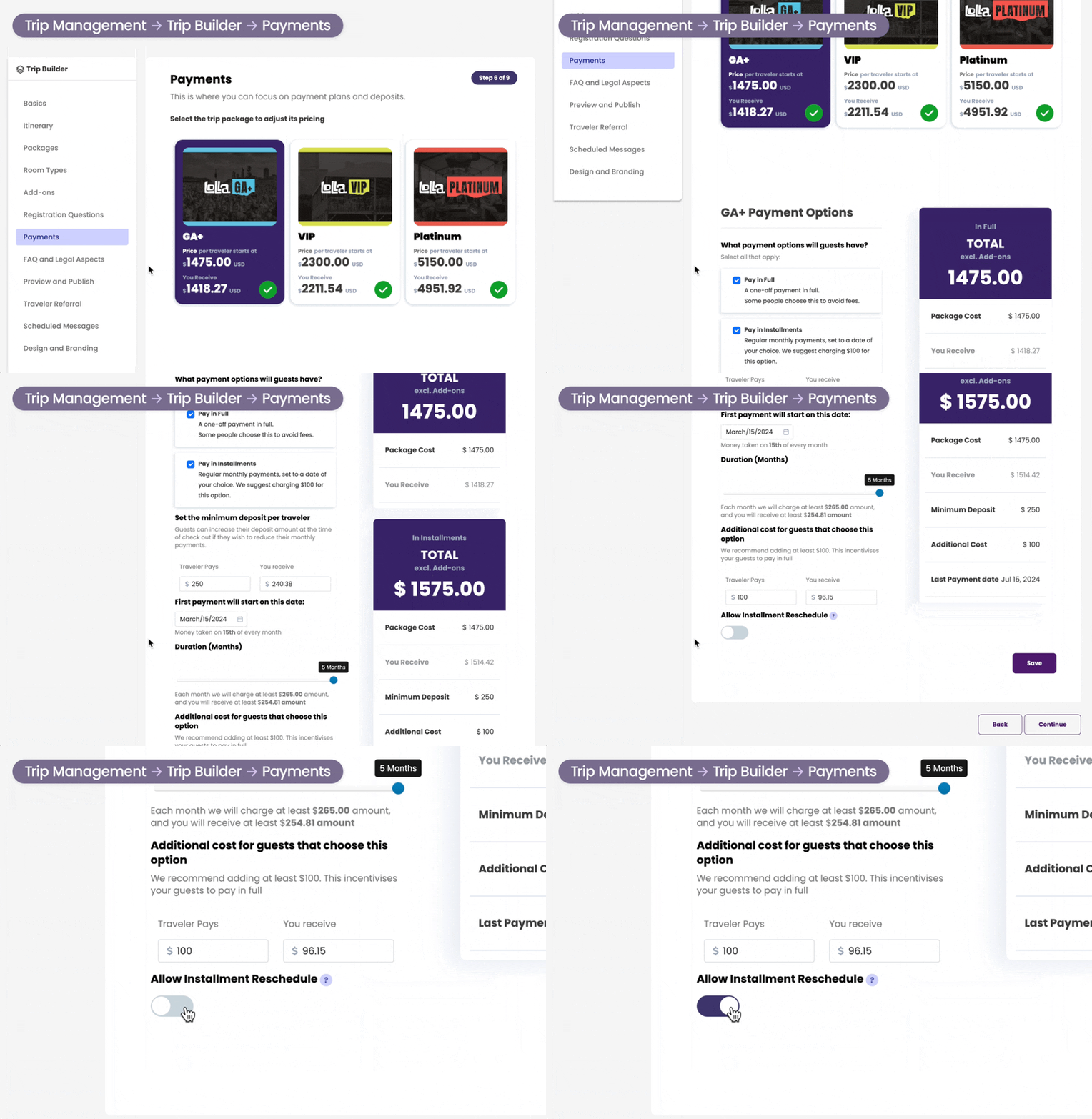
Organizers can now choose to allow travelers to take control of their auto payment schedule. If enabled, travelers can effortlessly reschedule their payment dates to match their schedule and financial preferences. They can select any date between the day after the current date and the last day to book the trip.

To enable installment rescheduling, go to:

Trip ManagementTrip BuilderPaymentsSelect PackageToggle “Allow Installment Reschedule”

Repeat for each package you want to enable installment rescheduling for. Don’t forget to save your changes!

SquadTrip|New Features & Updates

If an auto-charged payment fails, the system will schedule another attempt to collect the payment in 2 days. On the day of the failed payment, the traveler will see the failed payment status. The day after the failed payment, the system will change the label and the date to the next scheduled date. Both the Organizer and the traveler will be notified via email.

SquadTrip payment plan

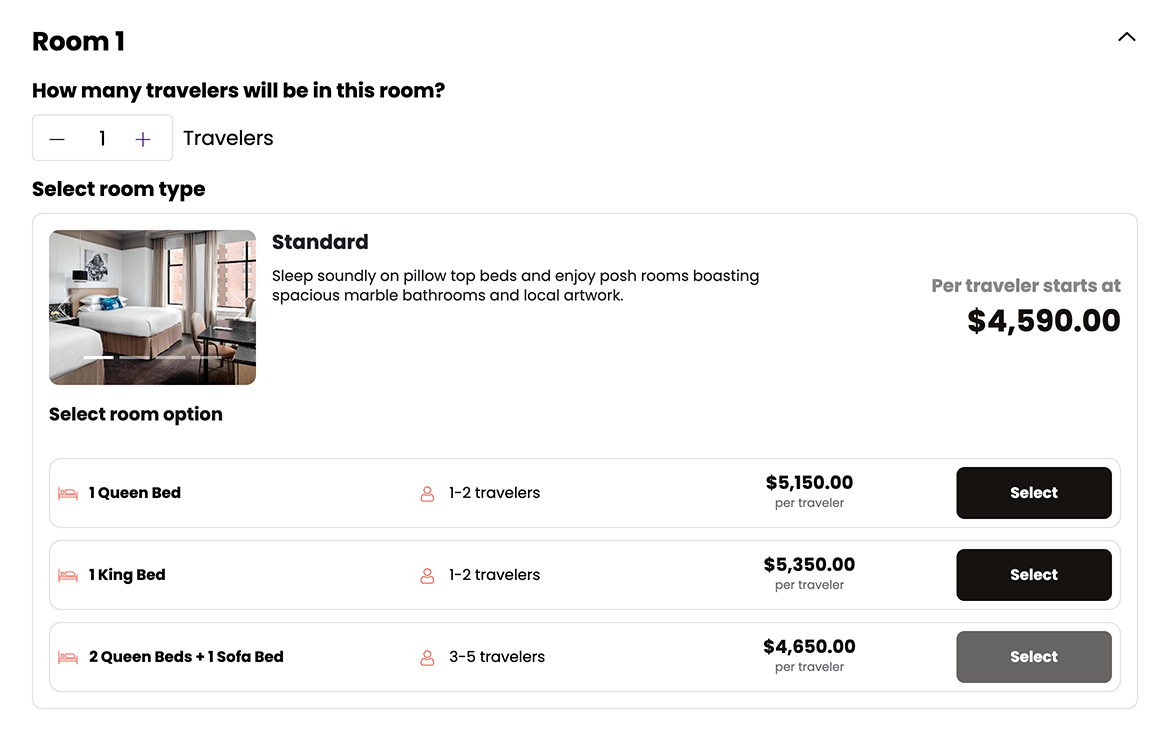
Occupancy limits, tiered traveler pricing, and specific room option bookings are here with Room Types! With Room Types, you can enforce traveler counts per room, offer specific room selections, seamlessly capture booking information to share with suppliers, and even offer tiered pricing for additional travelers.

Check out an example of Room Types in action:

SquadTrip|New Features & Updates

A picture is worth a thousand words. Trip pages, packages, and add-ons now support multiple photos! These photos will automatically be tiled on the trip page with a carousel for your travelers to scroll through.

To add more photos, simply go to the trip builder and upload additional photos to each section!

SquadTrip|New Features & Updates

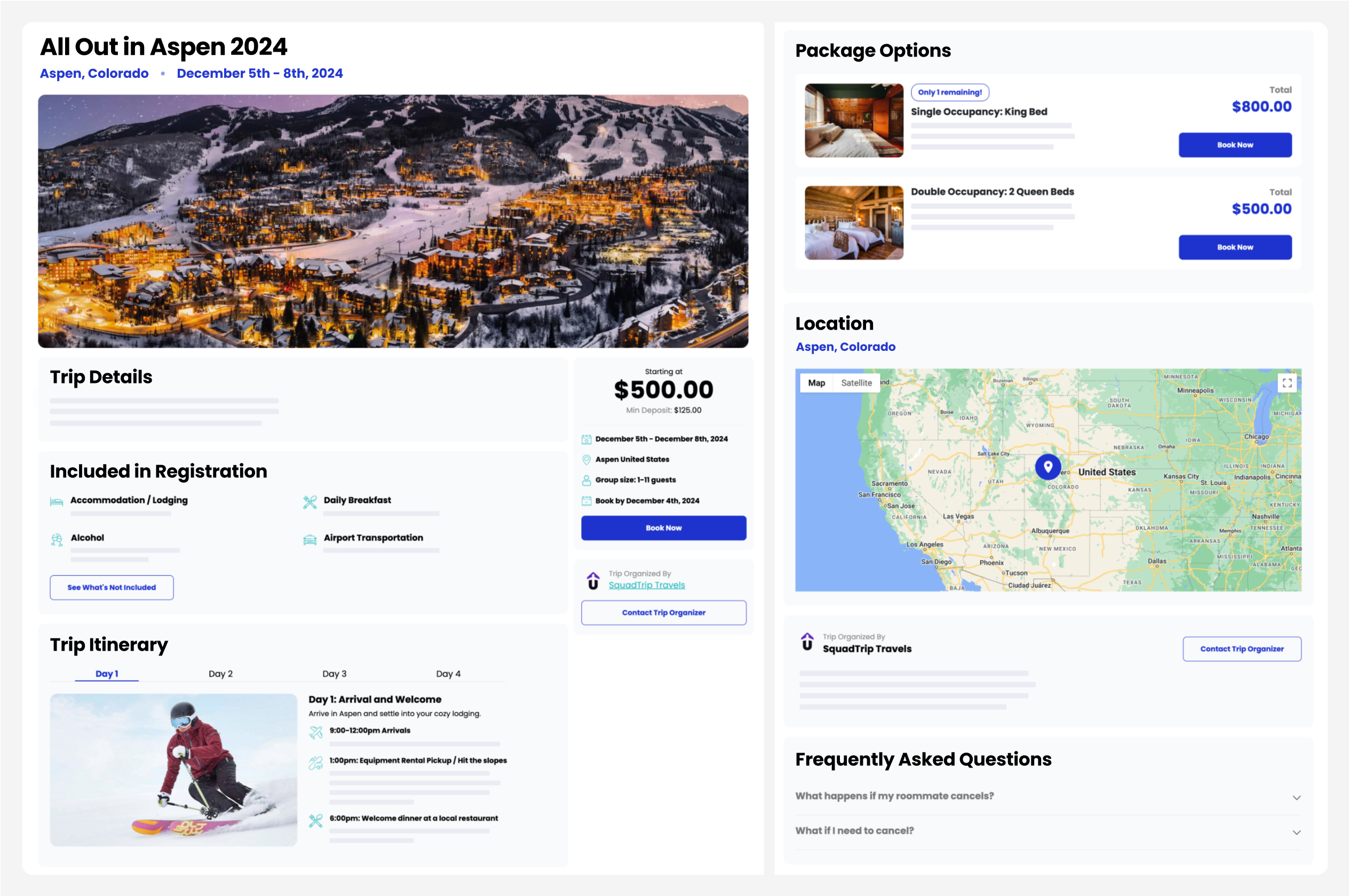
With larger photos, enhanced branding features, added trip details, mobile optimization, and so much more… the new trip page designs are guaranteed to WOW your travelers and elevate the professionalism of your travel brand. Did we mention they’re SEO and mobile optimized for conversions?

SquadTrip|New Features & Updates

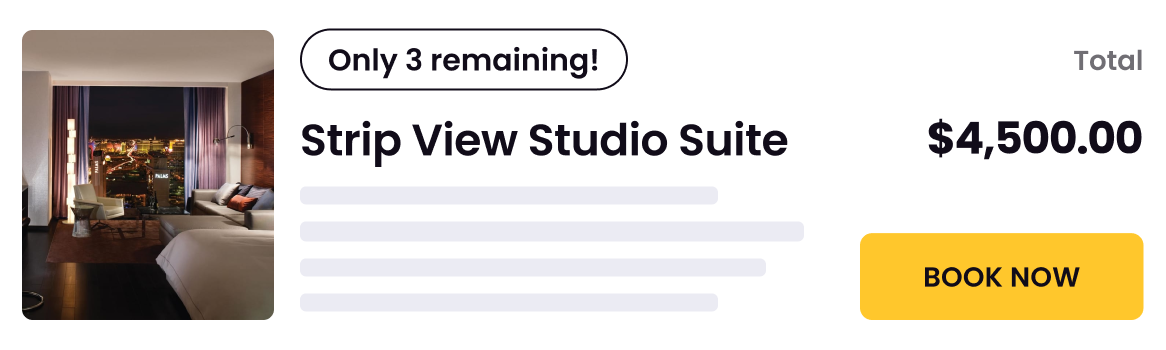
Create urgency by enabling the limited quantity promotion tag so travelers know there’s only a few packages left!

SquadTrip|New Features & Updates

Link your Instagram, TikTok, WhatsApp, or even your blog page to the footer of your trip page.

Social Media

From maps to microphones, we’ve combed through your trip pages and added 45 new icons for included amenities and the trip itinerary.

SquadTrip|New Features & Updates

When a traveler replies to an automated booking or payment email, do you want to receive the replies or should they go to the company inbox? Do you want to use your personal name or your company’s name?

Traveler requesting to upgrade to a Single Occupancy Ocean View? Trip organizers can switch packages for their travelers by going to the traveler’s account.

With Scheduled Messages, you can effortlessly draft and schedule your email messages in advance, ensuring that you never miss an opportunity to engage with your travelers at the perfect moment. Premium subscribers have access to this feature within the Trip Builder under “Scheduled Messages”.

SquadTrip|New Features & Updates

Multi-Quantity Add-Ons makes it easier to customize your trip packaging and share amazing à la carte experiences and products with your fellow travelers. Whether your travelers are booking for their partner or a group of friends, Multi-Quantity Add-Ons simplifies the booking process and ensures everyone in the group can purchase add ons before they’re sold out. Check out this blog post for 3 unique ways to configure trip packages.

SquadTrip|New Features & Updates

Complimentary Trip Booking enables you to provide exclusive 100% promo codes so you can extend invitations to partners and sponsors effortlessly while promoting additional add-on purchases.

We recently announced a new feature that allows organizers to absorb transaction fees, making it easier than ever to streamline the booking process for travelers. As part of this update, we also enhanced how additional payments to payment plans are applied to traveler accounts. When a traveler makes an additional payment, it is evenly distributed across the remaining installments, effectively lowering their monthly payment amount. If they prefer to make a payment for a specific installment, they can continue to do so by clicking “Pay Now” on their payment plan schedule.

By default, Payment Processing Fees are paid by your travelers. However, when you create a trip package type, you can choose who will pay the Payment Processing Fees.
  • Absorb fees: Click All fees are paid by organizer if you want the fees to be included in the price you set. Fees will be deducted from your sales.
  • Pass fees on: Click All fees are paid by traveler if you want attendees to pay the fees on top of the price you set. Fees will be collected off the top of your sales.
Trip organizers have the power to absorb the processing fee, ensuring travelers enjoy a seamless booking process without encountering any unexpected processing fees at checkout. Plus, we’ve made pricing a breeze by introducing a handy calculator, so you can effortlessly determine the total cost of your packages and add-ons, with fee charges included.
SquadTrip|New Features & Updates

With Flexible Deposit Payments, trip organizers can now set a minimum deposit amount for travelers enrolling in payment plans. Travelers, on the other hand, have the option to increase their deposit amount, giving them the freedom to reduce their installment payments.

SquadTrip|New Features & Updates

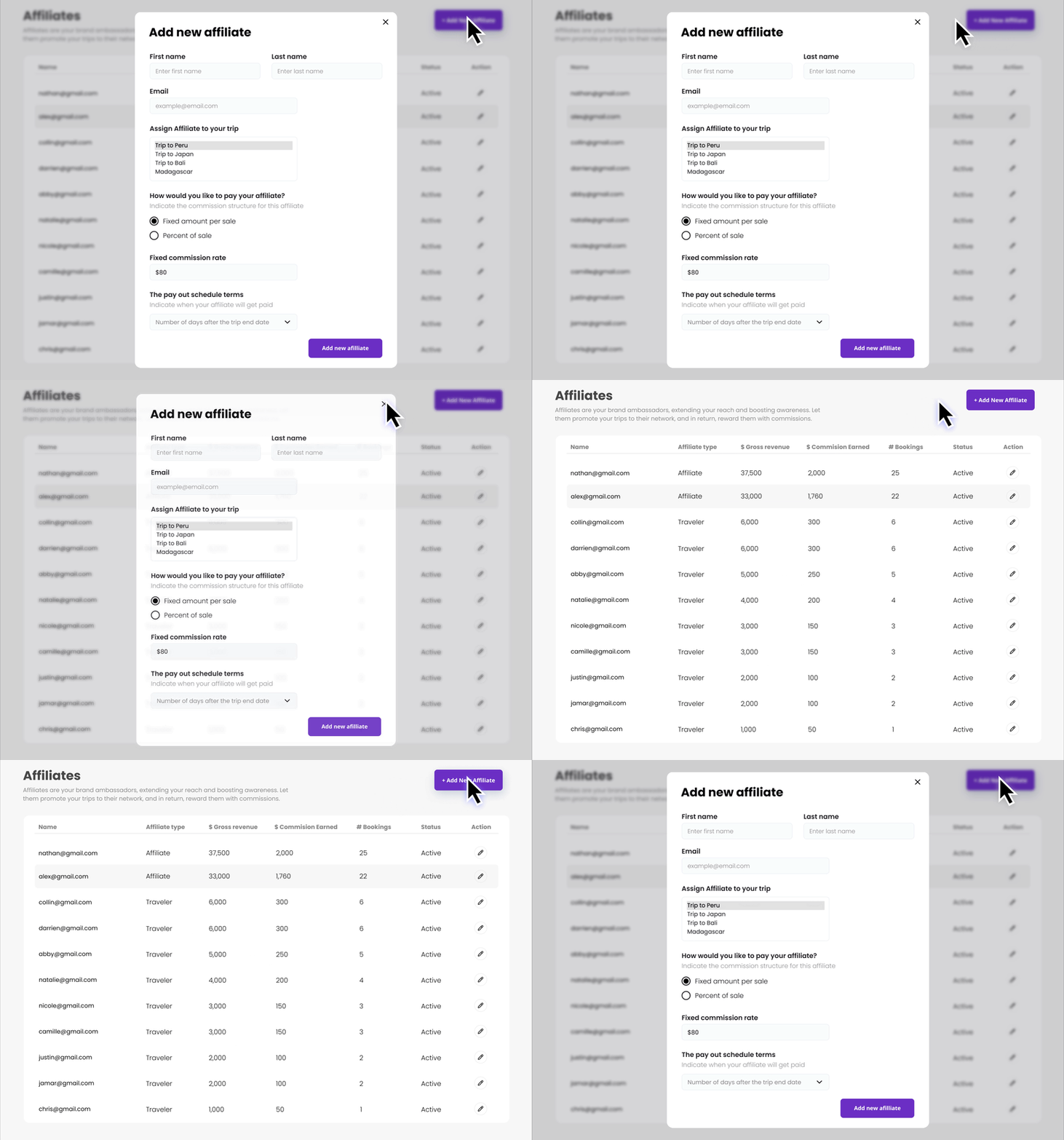
Now, organizers using SquadTrip can easily supercharge their trip promotions. This seamless feature allows you to invite affiliates who can effectively spread the word about your trips, while you effortlessly manage your list of current affiliates and their performance. Elevate your trip organization game with hassle-free collaboration!

SquadTrip|New Features & Updates

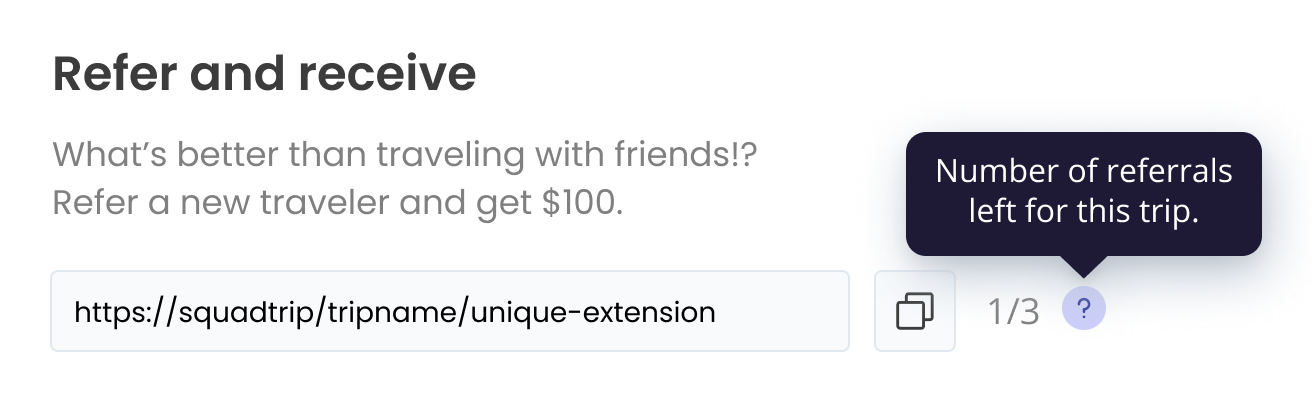
Travelers can easily monitor their referral trip sign-ups and stay informed about the remaining referral opportunities, including the number of remaining referral signup opportunities when organizers have enabled maximum referral reward limits.

SquadTrip|New Features & Updates

We’ve made several enhancements to the calculation and presentation of refunded amounts in the Guest List Information table. These changes ensure more accurate calculations and better visibility of refunded amounts in an Excel export.

Go to DashboardCompany Stats and scroll down to the Guest List Information section. In the table, scroll right to view the Total Refunded and Disputed Amount columns.

SquadTrip|New Features & Updates

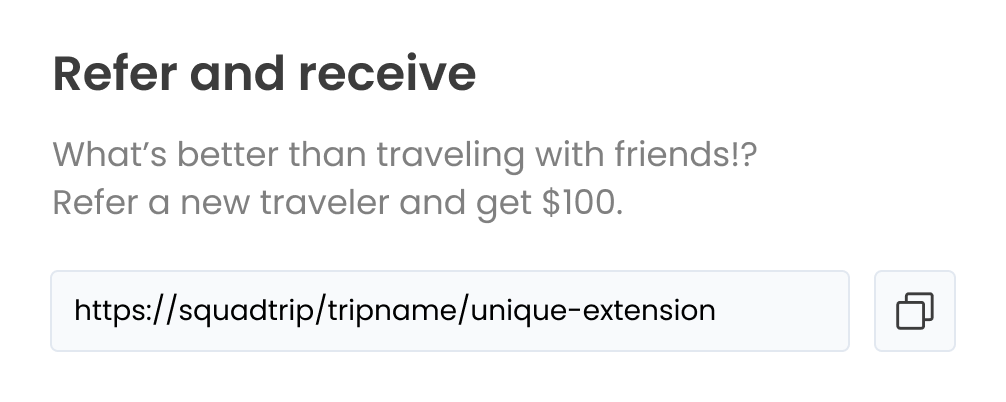
Introducing our “Refer & Receive” affiliate feature! Now, travelers can share trips with friends through a unique link and get rewarded with cash when their referrals sign up and participate in the trip. It’s a win-win for everyone! 🏆

⚙️ Organizers can choose to enable or disable referral links, customize the cash reward amount, and limit how many sign-ups travelers can be rewarded for.

SquadTrip|New Features & Updates

Enjoy improved package switching to handle a dynamic range of use cases and deliver a smoother experience. Additionally, we’ve squashed a few pesky bugs to ensure a reliable and stable app experience. 

How to Access the Feature

Go to DashboardCompany Stats or Trip Stats.

Select the traveler from the Guest List Information section on the right.

Next, click Change Package, and select the existing package to open the dropdown menu ▾ and select the new package.

Finally, click Save to confirm your changes.

Go to DashboardCompany Stats or
Trip Stats.

Select the traveler from the
Guest List Information section on the right.

Click Change Package, and select the existing package to open the dropdown menu ▾ and select the new package.

Finally, click Save to confirm your changes.

SquadTrip|New Features & Updates

How to Access the Feature

Go to DashboardCompany Stats or Trip Stats.

Select the traveler from the Guest List Information section on the right.

Next, click Change Package, and select the existing package to open the dropdown menu ▾ and select the new package.

Finally, click Save to confirm your changes.

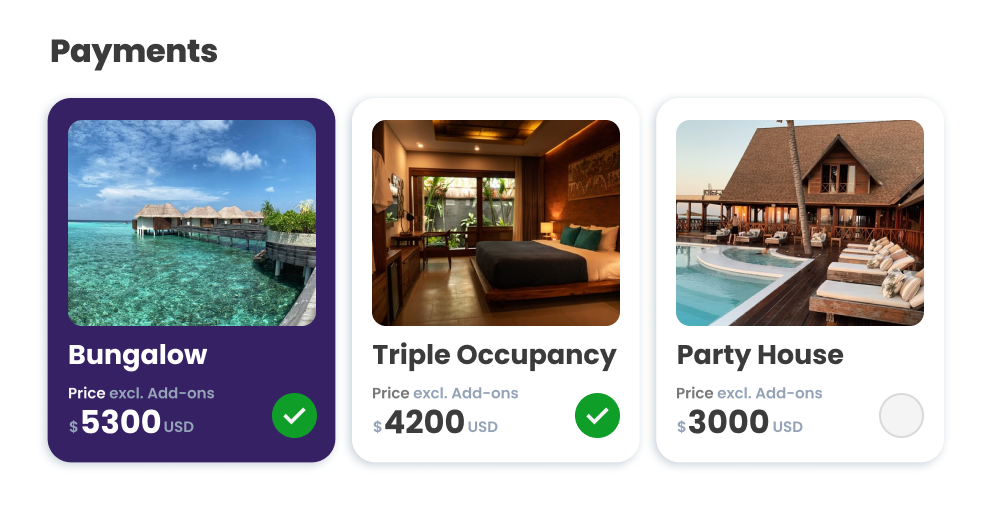
The Payments section within the Trip Builder now includes labels on packages with payment plans, making it more convenient to manage your trip payment setup.

You can access the Payments section in Trip Builder or DashboardTrip Management.

Access the Payments section in Trip Builder or DashboardTrip Management.

SquadTrip|New Features & Updates

Enhance your organizing experience with our brand-new Package Switching functionality! With just a few clicks in the Organizers Admin user interface, organizers can select a traveler, choose a new package, modify the payment plan, and enjoy a hassle-free process.

How to Access the Feature

Go to DashboardCompany Stats or Trip Stats.

Select the traveler from the Guest List Information section on the right.

Next, click Change Package, and select the existing package to open the dropdown menu ▾ and select the new package.

Finally, click Save to confirm your changes.

Go to DashboardCompany Stats or
Trip Stats.

Select the traveler from the
Guest List Information section on the right.

Click Change Package, and select the existing package to open the dropdown menu ▾ and select the new package.

Finally, click Save to confirm your changes.

SquadTrip|New Features & Updates

How to Access the Feature

Go to DashboardCompany Stats or Trip Stats.

Select the traveler from the Guest List Information section on the right.

Next, click Change Package, and select the existing package to open the dropdown menu ▾ and select the new package.

Finally, click Save to confirm your changes.

Rearrange and edit items you’ve added to the trip without losing any information you’ve already added to the page.

You can access the Itinerary section in Trip Builder or DashboardTrip Management.

Access the Itinerary section in Trip Builder or DashboardTrip Management.

SquadTrip|New Features & Updates

Your customers can now easily go back to change their selected Payment options during the checkout process if needed.

You can access the Payments section in Trip Builder or DashboardTrip Management.

Access the Payments section in Trip Builder or DashboardTrip Management.

SquadTrip|New Features & Updates

Use the search bar to quickly access the active trips you’re looking for. You can find this new feature on the Dashboard page.

You can access the search bar from your Dashboard.

SquadTrip|New Features & Updates

Forgot a step? Don’t worry, we’ll alert you if we find you forgot to add payment plan options for travelers.

You can access the Payments section in Trip Builder or DashboardTrip Management.

Access the Payments section in Trip Builder or DashboardTrip Management.

payment plan screenshot

Time is money. Customers can use auto-fill to quickly populate their address, making the payment process quick and user-friendly.

SquadTrip|New Features & Updates

Get your travel group added to our list.

Get your travel agency added to our list.

Missed the webinar?

Join our email list for access to the webinar replay, plus tips and access to premium content!